Day 476: Week 69 Plan
Week 68
Goals
-
Foundation
-
❌ Go to sleep before 12am at least 3 times
- 2 out of 3. Close but no cigar.
-
-
Browserflow
- ❌ Organize gallery
- ❌ Add more flows to gallery
- ❌ Invite more people from waiting list to see how well the new onboarding works
The story of this week: I didn’t work on onboarding at all. Instead, I worked on two new features:
- Support for writing to spreadsheets from multiple Google accounts
- Configuration variables
The spreadsheets stuff honestly isn’t that important right now and it could’ve waited.
The configuration variables work, though, is pretty exciting because it makes using imported flows a lot easier. Given that I think most people will download Browserflow in order to use a shared flow they came across, this is pretty important.
Often, a flow isn’t meant to be run directly as-is — there will be some part that users will want to customize. For example, a flow to scrape a Twitter page should allow changing whose Twitter page you scrape. Previously, you had to do this by finding the relevant command and changing the field. This is challenging because it requires going through the flow and understanding what’s going on just so you can modify one piece of it. Most people won’t have the knowledge or patience to do that.
A workaround is to create a Run Script command at the beginning of the flow that initializes variables. This is much better as it doesn’t require hunting through the flow, but it can still be confusing for non-technical users.
Another workaround is to run an Ask for Input command that asks for the customizable field. This is much more user-friendly, but it has the downside of requiring the user to fill in that field every time they run the flow. That can be annoying if there’s only one value you want to use but you want other people to be able to change it easily.
To add to this, all these workarounds don’t solve the problem where you might not want to expose certain information when you share the flow. Perhaps it includes a link to a Google Sheet that you’d rather keep private. Perhaps it fills in personal details into a form.
The new configuration variables feature solves all of this by showing a screen when a flow is imported that helps the user setup their flow:
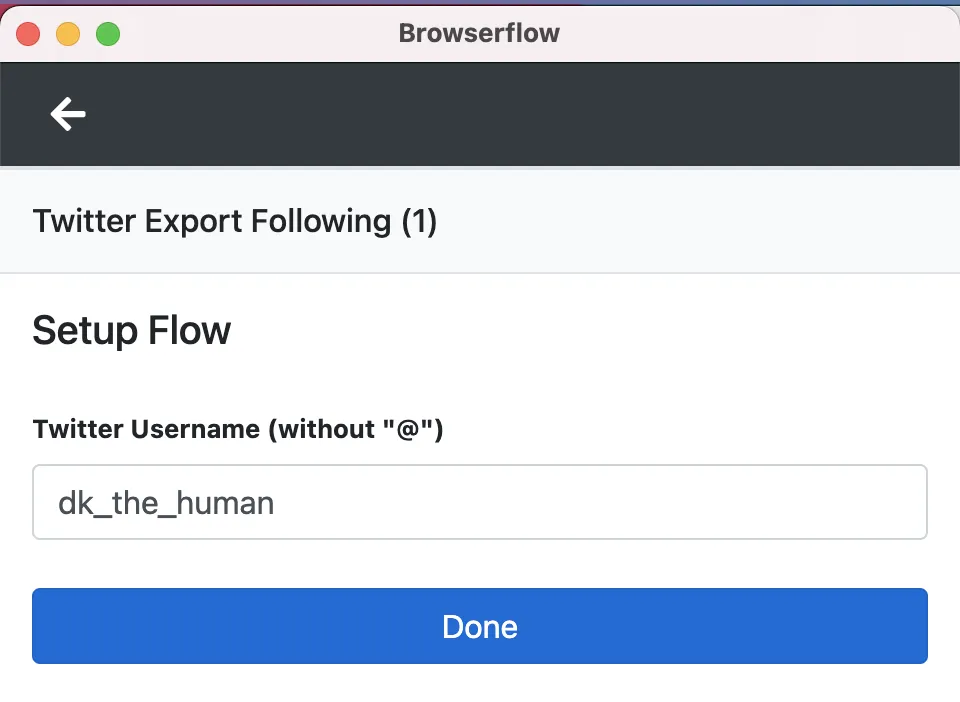
This is going to make it much nicer for people to import a shared flow, fill in some fields, and have a flow that works for their use case right away.
Week 69
So my original plan was to work on onboarding this past week and then launch Browserflow this upcoming week. That’s not going to happen as I still have yet to build out onboarding.
And that’s perfectly okay. I’ve been feeling super excited about Browserflow these past several days, and it’s because it finally feels like everything’s coming together. There’s still one piece that I want to work on before releasing: the spreadsheet stuff.
I’ve had three different people tell me about things they’re trying to build using Browserflow that requires the ability to read the spreadsheet from the cloud and/or update the spreadsheet after performing some action that I’d like to get this together before launching. It turns out that being able to persist state opens a whole world of use cases. (The ones I’ve been asked about: automating actions on items on a site but not repeating the ones already processed; updating a spreadsheet with new items from a list but not adding old ones; sending responses to users on a service but only if one hasn’t already been sent.)
I’m also glad I’m not launching this week because it’s my last week here with the Vegas crew and I’d like to spend more time hanging out rather than putting out fires before we go our separate ways.
New goals:
- Implement spreadsheet stuff this week
- Add onboarding stuff next week
- Launch Browserflow the following week
Honestly, it’s more likely than not that the launch date will get pushed back a bit. I’d just like to have it out before I actually hit my one year mark at the end of May (a month from now!).
Goals
-
Foundation
- Go to sleep before 12am at least 3 times
-
Browserflow
- Add “Get Spreadsheet” in cloud
- Add “Update Spreadsheet Row” in extension and cloud
- Add “Loop Spreadsheet Rows” in extension and cloud
- Add “Find Spreadsheet Row” in extension and cloud